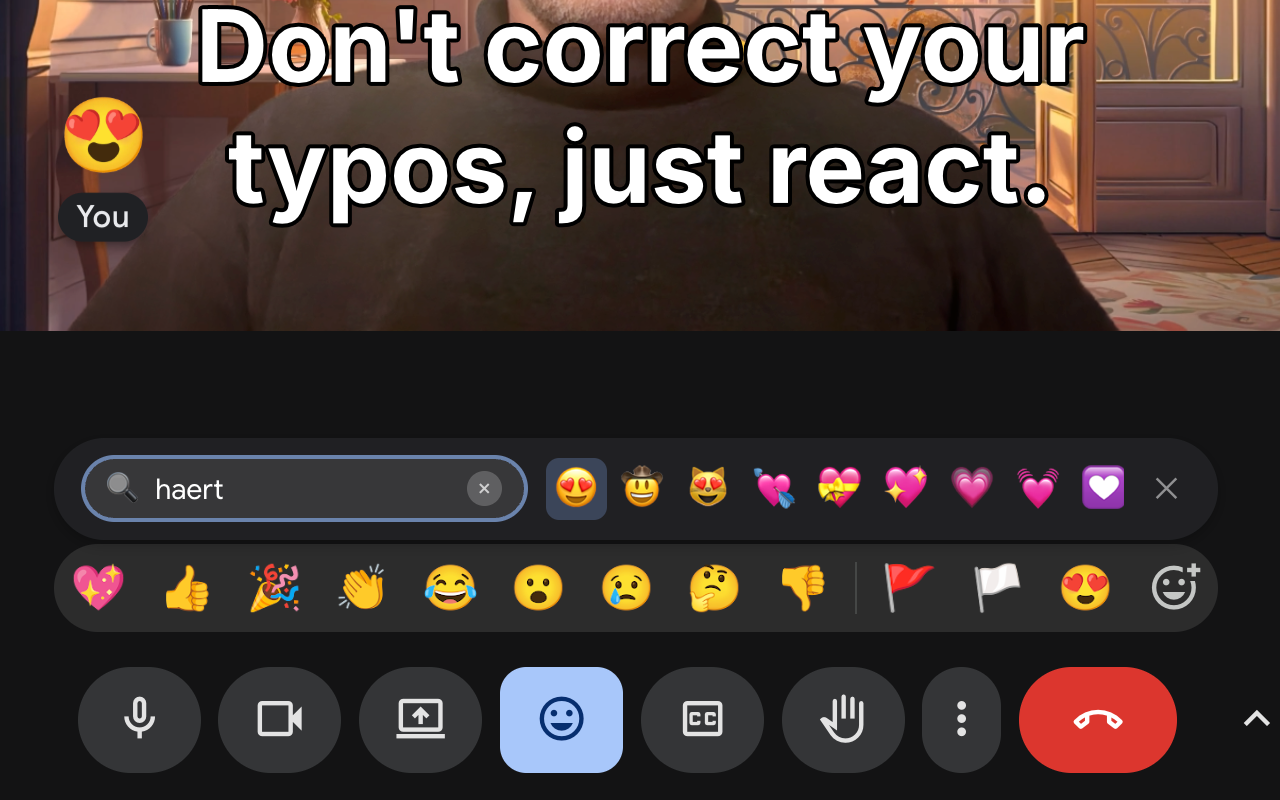
I use emoji reactions in Google Meet a lot, but I have a problem with its emoji picker: it is too slow for conversation.
When someone drops a bombshell in a meeting, you have about 2 seconds to react. That is the “social window.” If you drop a 🤯 emoji 10 seconds later, it’s awkward. The native Google Meet picker is not built for speed or even convenience. You open it, scan 9 standard emojis, click “More”, and scroll… by the time you find 🚀, the topic has changed.
I built Google Meet Reactions to fix this. I wanted the speed of “Type to react” (like Slack), but smarter - it should remember frequently used images and let me search by rough description. And so it does.
Try it out:
- Install from Chrome Web Store: Google Meet Reactions
- Website: googlemeetreactions.com
- Project Page: Google Meet Reactions
The “Cmd+F” for Feelings
With this extension, the workflow changes to:
- Open the bar.
- Type “party” or “bday” or even just “clebrati”.
- Getting 🥳
The search bar is auto-focused the moment the menu opens. You don’t need to reach for your mouse.
It remembers your favorites
I used to be frustrated when emoji picker in both Google Meet and Slack (another daily tool of mine) wouldn’t remember which “check” mark I prefer. This extension uses Frecency (Frequency + Recency) to track what you use. Type “y” and you get your favorite “yes” emoji immediately, whether it’s 👍, ✅, or 🫡.
It tolerates your typos
In the heat of the moment, nobody types perfectly. I used to type “thunbs” and get zero results in other pickers.
I significantly tweaked the search algorithm to be “fuzzy.”
- Type
fier→ get 🔥 - Type
thmb→ get 👍 - Type
celeb→ get 🙌
Deeper than filenames
Most pickers only search the emoji name (e.g. “thumbs up”). But that’s not how we think. I added LLM-generated descriptions to the search index. So you can search for Concepts.
- Type “mind blown” → 🤯
- Type “satisfaction” → 😌
It reads the room (literally)
This is the cool social part: The extension tracks what emojis are trending in your current meeting. If a colleague sends a 🦞 (lobster), “lobster” gets a temporary boost in your search results. If the whole team is spamming 🔥, the fire emoji floats to the top of your list. It helps you stay in sync with the team’s energy without hunting for the specific emoji everyone is using.
Privacy First
The extension is free and privacy-focused (zero tracking, runs locally).